Google
WWW avastu.com
ashishanand85.blogspot.com
ashishanand85.googlepages.com
Showing posts with label Technology. Show all posts

Saturday, June 2, 2007

Web 2.0: What Is It Really?

According to my pal Wiki, "Web 2.0", a phrase coined by O'Reilly Media in 2003, refers to a perceived second generation of web-based communities and hosted services — such as social-networking sites, wikis and folksonomies — that facilitate collaboration and sharing between users. Though the term suggests a new version of the World Wide Web, it does not refer to an update to Web technical specifications, but to changes in the ways systems developers have used the web platform.


The image “http://www.andybudd.com/presentations/dcontruct05/images/zen2.jpg” cannot be displayed, because it contains errors.

As the name suggests, Web 2.0 describes a set of next-generation Internet technologies. It's about social networking, user-generated content, glowing drop-shadowed logos, blogs, AJAX, mashups, and tagging. It's the next revolution on the Web!" These protocols and tools make it easier to create online applications that behave dynamically, much like traditional PC-based software. They're also highly social, encouraging users to manipulate and interact with content in new ways. Web 2.0 pushes computing power off the desktop and onto the Internet, which means less time and money spent on PC software administration. As a general rule, Web 2.0 tools are also less expensive than traditional software — and many are even free. Because they're Web-based, all you need to get started is an up-to-date browser.

People aren't happy with just a site anymore. Now they want it sprinkled with magic fairy Web 2.0 pixie dust before they're happy ;-) But the fact is that NOBODY has any idea what it really is! Ask a dozen tech pundits to describe Web 2.0 and you're likely to get two dozen explanations as to what it is. According to Tim O'Reilly, "Web 2.0 is the business revolution in the computer industry caused by the move to the internet as platform, and an attempt to understand the rules for success on that new platform." The precise definition remains open to debate.

Monday, May 7, 2007

Virtual Appliances - The Good, The Bad & The Ugly

I was going through Dan Kusnetzky's blog and came across this interesting piece of writing on virtual appliances. Read on.

Every now and then, a supplier of an IT application or tool tells me about their plans to encapsulate their product into a virtual machine and deliver it to the market. Although this seems to be a great idea, this approach isn't always the best way to approach software distribution.

  • The Good — an encapsulated application or tool is easy to install. All that's necessary is to copy the virtual machine file and virtual machine "Player" to the target system and away you go. All of the chores involved with installing the operating environment, database software, application framework software and the application itself have already been done. If the application or tool is difficult to install properly, the vendor might be motivated to offer it as a virtual image rather than requiring its customers to go through a painful process.
  • The Bad — virtual machine files have a tendency to be large. If the supplier's intention is that organizations acquire this software by a download process, it may take quite some time and consume quite a bit of network resources from the time the button was clicked to the time the software has actually arrived safely. If the organization is in a region known for unreliable network service, this process may be a major obstacle. Since one size won't always fit everyone, the organization would be well advised to know how the virtual image differs from the software that is delivered in another way. It would also be wise to learn what steps are necessary to tune or optimize this software.
  • The Ugly — software licensing can rear its interesting head and make the organization adopting this software into a villain! Since an entire operating system, database software, application framework and application software may be part of this virtual machine image, it may bring along with it a licensing conundrum. It's very easy to make and run multiple copies of this virtual machine. It is also very easy to share this virtual image with partners and customers. A few key questions to consider are:
    • Does the organization need to acquire (and pay for) software licenses for each layer of software in each virtual machine that is stored or used on their network?
    • Does it have the right to share this software?
    • Does it have the right to modify this virtual image in any way before deploying it?

If all of this software is protected by an open source software license, the organization may not face additional charges or restrictions. If the company has a site license from each of the vendors of each of the layers of technology in the virtual machine image, if may be able to run multiple copies within the ways of their own facilities but not share the image with others.

It would be very wise for the organization's IT department to find out what licensing applies to a virtual image. It would be much better if the terms and conditions of use are known and the appropriate operational and administrative procedures defined before a virtual image is unleashed on the network.

Some suppliers of operating systems, database management software and application frameworks have such a complicated and confusing set of licenses for their products that the answers to these questions might be hard to find.

Is your organization using virtual appliances? What tasks are they performing? Has your IT department learned something that others should also know?


Wednesday, May 2, 2007

Virtual Appliances

What exactly are virtual appliances? I am confronted with this question more often than not. This is how Wiki answers the question:
A virtual appliance is a minimalist virtual machine image designed to run under VMware, Xen, Microsoft Virtual PC, QEMU, Usermode Linux, CoLinux, Virtual Iron or other PC virtualization technology, providing network applications like firewalls or webservers. Virtual appliances are a subset of the broader class of software appliances. Like software appliances, virtual appliances are aimed to eliminate the installation, configuration and maintenance costs associated with running complex stacks of software. A key concept that differentiates a virtual appliance from a virtual machine is that a virtual appliance is a fully pre-installed and pre-configured application and operating system environment whereas a virtual machine is, by itself, without application software.

The VMware Technology Network (or the VMTN) draws an interesting analogy between computing appliances and virtual appliances. A computing appliance is a class of computer product which is designed with a specific function in mind and has limits on the ability to be configured beyond that specific function. Generally, the reason devices are called appliances is that they share some characteristics with more traditional household appliances. In that regard, computing appliances tend to be:
  • Designed to provide a specific set of functionality
  • Limited to specific vendor provided configurations
  • Closed and sealed devices
  • Not repairable or upgradable by the owner
  • Simple with a limited user interface
  • Intended for plug-and-play installation and setup
A virtual appliance is similar to a 'traditional' computing appliance and is designed with a specific function in mind. The major difference is that instead of being built on a physical computing device, a virtual appliance is built using virtual machine and can be run on any virtual platform. A virtual appliance starts with a pre-installed and pre-configured operating system. In addition to the base operating system, a virtual appliance contains a pre-installed and pre-configured application. The application may have multiple components and services to provide the required functionality.

The key benefit to building virtual appliances is that developers/vendors no longer need to build, test, and ship physical hardware devices while they still maintain the benefits of providing a ‘sealed’, purpose-built solution. The key benefits to users of virtual appliances focus around simplicity. Virtual appliances can be deployed in a user's environment quickly and easily with very little interaction.

Tuesday, April 24, 2007

Microsoft Silverlight - Flash Killer?

Microsoft Silverlight is a cross-browser, cross-platform plug-in for delivering the next generation of media experiences and rich interactive applications (RIAs) for the Web. It integrates with existing Web applications and, of course, almost all Web technologies you are already using like Ajax.NET Professional or ASP.NET in common.

Read this article by Tim for more info.

And here's what the critics have to say -
Flash killer my ass ;-) I'm sure it'll have a few neat and useful features, a bunch of poorly implemented features, and a whole bunch of half-assed Flash rip-offs. Bottom line, it'll find a place with .NET guys who don't have a Flash background and probably a few other groups of people. But a Flash killer? Come on.... And that's not a comment aimed at your use of the term Flash Killer, Aaron. I know that's a term that's been thrown around about this since the world got wind of it. It's such a Microsoft idea. Replace rather than do something that hasn't been done. Like I said, it'll have it's place but to think any of us are going to switch over...

Monday, April 23, 2007

XP --> Vista --> Vienna ?

Windows Vista may well be on its way out. Reports from PCWorld suggest that Vista's successor, Vienna, is due in 2009 (just two years from now!). Actually, Vista was expected to release by 2003, but that didn’t happen. Microsoft was forced to put more work on developing Windows XP SP2 rather than giving time to Vista. Finally, Vista ended up losing features like WinFS, native HD DVD, FireWire-B support, enhanced speech recognition and PC-to-PC sync. Vienna will hae it all and it might just include a brand new file system and a new user interface which eliminates start menu and toolbars.

I believe the probability of Vienna releasing in '09 is very low. If it is really true, then upgrading to Vista doesn’t make any sense to me.


Sunday, March 25, 2007

No open source future for Virtualization?

Industry experts take Dana Blankenhorn on as he believes that there is no open source future for Virtualization. Tarry Singh, CEO Avastu Appliances, says:

I don't get it. Is it taking a jab at all other firms like Redhat, Novell, Virtual Iron and warning them not to rely too much on Xen? This summary is rather succinct and honestly does not do any justice to what the Open Source is capable of.

Alex Weeks, author of the Linux System Administrator’s Guide, says :
Like Tarry, I don’t get Dana’s point. In fact, I’m not even sure why ZDnet published this. It really lacks any point. I think he’s trying to make a point without really understanding the technology. Or any technology for that matter. I read some of his other articles, and he doesn’t seem to get any where. It’s like he’s writing inside jokes that only he understands. In his articles, he starts to go somewhere but never goes there.


Indeed open source is important to our future and virtualization is the next big thing. Combine the two and what you get is a deadly mix!

Friday, March 23, 2007

Virtualization & Open Source in India

The Indian IT market is estimated to touch $65 billion by 2009, posting a compound annual growth rate of 21 percent. The market, on the back of strong demand over the past few years, has emerged as the fastest-growing one in the Asia Pacific region.IDC India Limited, an IT industry analyst firm, has predicted that the year 2007 will witness Indian enterprises graduate to the second level of Dynamic IT infrastructure – where IT infrastructure can effect changes fast in response to the changing business scenario. The key technology components to attain this state are virtualization, SOA and application integration. CIO India examines the impact of open source & virtualization.


.......What has caused the effective price of virtualization to head toward zero -- and how? In contrast to many who seem to feel that open source and proprietary software operate in two parallel but separate universes — that open source is used by people who can’t afford ‘real’ software, while proprietary commercial software is for organizations that need reliability, scalability, and all the other ‘abilities’ — I believe that open source is already challenging the proprietary software world.

How about a case study to test the theory? Let’s look at virtualization, something that has tremendous potential with a clear payoff: reduced costs for IT organizations, both hard (power, machines) and soft (admin and operations personnel). It evinces an undeniable fact: machines are improving so fast that they make possible a change to the traditional hardware infrastructure, breaking the bounds of the one machine, one application practice used by most IT shops....

Read on.


Thursday, March 8, 2007

openQRM Virtual Appliance: Manage your Linux, Unix, Windows Virtual & Physical DataCenter!


The Avastu Team with close cooperation with the openQRM Team, has released the Virtual Appliance.

Get it on the VMTN Appliance Market Place:

NOTE 1: To download the appliances please send an email to: info[at]avastu.com

NOTE 2: For requesting downloads @Avastu please do NOT use free email addresses such as hotmail.com, yahoo.com etc.

This is a "Complete Datacenter Management & Provisioning software" with


  • File system images of Fedora Core 5 AND Centos 4

  • Two diskless nodes

We can customize the product and help you deploy it in your test, development labs and even production! (We are already assisting our current client with several openQRM installations in production).


Details for Testers/Developers/Administrators:


  • user = root

  • password = sysadmin

  • File System Images: Fedora Core 5, Centos 4

  • Nodes : 2 (two) diskless nodes

  • IP address for url: 192.168.1.100

  • WebAdmin username= qrm

  • WebAdmin password = qrm


What can openQRM do?


Data center needs and problems


Growing number of commodity servers leads to:


* Increasing number of failures – furthering downtime.


* Servers managed individually lead to:


  • greater opportunity for operator error

  • inconsistent imaging and policies applied across servers

  • over-provisioned or peak-provisioned systems

* Growing management costs – hardware and software are a small part of the price.


Bottom line: System administrators spend a significant amount of time either fighting fires or repeating multiple steps to manage a growing number of individual Linux boxes. Ultimately, the x86 data center is not always reliable, does not meet business needs, and creates inefficiencies in terms of administrative costs per server.


The Solution


Open Resource Manager addresses the needs of the modern data center by:


  • Improving reliability on the hardware and application level

  • Giving system administrators full control of the data-center

  • Provisioning servers within a few minutes

  • Consistently applying policies across servers

  • Adjusting resources based on business demands

  • Managing heterogeneous x86 hardware

Read More at openQRM site


Enjoy your virtual appliance!

Avastu Associate's Interview with BusinessWorld

Sridhar, an associate of Avastu, has setup his own firm in China and is currently working as Director, Shared Services and Offshoring, of Morgan Chambers. He gave an interview to the BusinessWorld during the Nasscom 2007 – India Leadership Forum. Chek it out here!

Wednesday, March 7, 2007

Do You Ubuntu?


Ubuntu is "the belief in a universal bond of sharing that connects all humanity." Some say Ubuntu means 'I am what I am because of what we all are' (Tarry's tagline "extended" :p). Don't worry guys, I am not thinking of becoming a poet - at least not in the near future ;-)
Well, Ubuntu is a free, open source Linux-based operating system. The choice of Ubuntu as the name for this OS reflects a deep appreciation for the supportive, cooperative collaboration that is the basis of the Open Source Software movement, the global nature of the participants in the Ubuntu project, and the rich, helpful community that is growing up around the Ubuntu distribution.

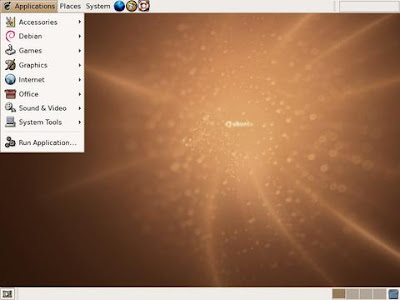
Ubuntu's DESKTOP

Ubuntu has a pretty desktop at startup. The Gnome taskbar is quite user-friendly. Look at the screenshot and speculate for yourself.


NAUTILUS (File Manager)

Nautilus is Ubuntu's file manager. It works in two modes - the browser mode and the simple mode. The simple mode is stripped down and is probably the fastest file manager in Linux. But the simple mode isn’t advisable for someone who is extremely familiar with windows. The sidebar isn’t limited to showing the folder tree only. It can be used to show information about the folder and the selected items.


OPEN OFFICE

Open Office is similar to MS Office. There are many added advantages too, like the built in Export to pdf tool. It includes the key desktop applications, such as a word processor, spreadsheet, presentation manager, and drawing program, with a user interface and feature set similar to other office suites.

BROWSERS

The default browser is Firefox. You can also download and use other Gnome browsers like Galeon or Epiphany.


RHYTHMBOX

Rhythmbox is the default music player for Ubuntu. It does not look cool at all and has a dull interface. And it's nothing more than ordinary when compared to other media players such as the windows mp, the iTunes, winamp etc.


Ubuntu has fuelled the ongoing debate between the open source advocates and proprietary software makers & users. Can Linux offer a viable alternative to Microsoft Windows?
It can! Try it to believe it.


PS: Ian Murdock, the “ian” in “Debian”, founder of the Debian distribution uses Ubuntu on his desktop!

Friday, March 2, 2007

How to Calculate Your Server TCO?

With the current focus on fiscal responsibility and due diligence, CIO’s and IT executives have indicated that more than 80% of current IT purchases require financial analysis for justification. In an effort to to justify the use of server virtualization platforms, I devised a model for assessing the 'Total Cost of Ownership' (TCO) of any production (server) environment. TCO analysis for the server park should ideally be done for a period of 4 years since the estimated lifetime of a server is 4 years. Yearly / monthly TCO can thus be obtained to get a fair idea of how much is being spent yearly / monthly. Following are the major points on which the TCO calculations are based:

Hardware Costs

  • Cost of physical servers
  • Cost of processor/RAM upgrade
  • Cost of extra storage devices
  • Cost of SAN
  • Cabling cost
  • Cost of racks

Software Costs

  • Cost of OS
  • Cost of anti-virus s/w
  • Cost of backup s/w
  • Cost of server management software (NetIQ etc.)
  • Cost of other softwares

Vendor Support

  • Cost of service agreements
  • Cost of warranties

Setup & Maintenance

  • Cost of setup of servers
  • Cost of installation
  • Cost of maintenance
  • Cost of training
  • Cost of consultancy

Facility Costs

  • Power & cooling costs
  • Flooring costs

The TCO thus calculated may then be used to model typical data center strategies and best practices of specific alternative server and operating system solutions. The calculations should be performed using comparable competitive scenarios.

Thursday, March 1, 2007

Why Virtualize?

Are your IT costs getting out of control, as multiple desktops, platforms, applications, and software versions proliferate across your organization? Do you know how much you’re really spending throughout the IT lifecycle? How can you reduce these IT costs? How can you lower your TCO? Why should you go ahead with (server) virtualization?

In 2006, I spent an entire month calculating, analyzing and assessing the TCO of the server park of one of the largest universities in the Netherlands - the Hanze University. They have over a hundred and twenty servers in their production environment. I, along with the IT managers, concluded that virtualization is imperative for any IT organization facing the aforementioned problems on account of the following:

  • Underutilized x86 boxes – Average CPU utilization rate of 5-10 % has become a norm rather than an exception
  • Repeatable Admin tasks – Installation of various softwares is done over and again for each and every physical server and thus, a lot of time and money is spent on repeatable tasks.
  • Floor Space – A lot of costly floor space is being used by the astronomical number of physical servers in the production environment.
  • Hardware / Support Costs – The servers and the service agreements cost a lot. Appropriate measures have to be taken to contain these costs before it’s too late.
  • Power / Cooling Charges – The ever increasing number of physical servers consume a lot of energy and you end up getting huge bills for the electricity charges.
  • No time / money left for R&D


Google
WWW avastu.com
ashishanand85.blogspot.com
ashishanand85.googlepages.com